
When the good people from ujam contacted us about doing a review of Virtual Pianist Grit, we were a little skeptical. The description on the ujam’s website included the phrase, “you don’t even need any piano skills,” which immediately made us wonder if this plug-in was appropriate for our audience. However, curiosity got the better of us, and ultimately, we were glad it did, as this plug-in not only is based on an uncommon keyboard instrument, but it also sports a surprisingly cool interactive player. That player is not just for beginners, and it proves useful for composers and producers looking to rapidly nail down a keyboard rhythm track that sounds good. And even without the player component, it’s just a very good sounding keyboard virtual instrument.
| Category | Value | Rating |
| Features | 20% |  |
| Usability | 25% | |
| Sound | 25% | |
| Documentation & Support | 10% | |
| Price | 20% | |
| OVERALL RATING = 3.5 Stars 3.6 stars or better: Outstanding, WIHO Award 3 stars or better: Worth considering 2 stars or better: Suited to specific needs 1 star or less: Not recommended |
||
The piano recreated is the Wurlitzer 120, an electromechanical piano that uses reeds (not tines like a Rhodes) to create sound. This pre-dates the better-known and later model 200a, and used vacuum tubes instead of solid state components. To put it into context, the keyboard used by Ray Charles in his hit, “What’d I Say,” was a Wurlitzer 120. The sound of the 120 is markedly different than the 200a, and you’ll notice shorter sustain and a little more bite. These classics are much less common to come across now, and if you are lucky enough to even find one, it will either need a lot of repair work or be pricey if in good condition.
This choice of piano to recreate was intriguing to us (especially given we have a real Wurlitzer 200a in the studio), hence our decision to take a look! For those geeky enough like us to look into the differences, keyboard wizard Anthony Marinelli has a great video with audio comparisons here:
To install, you need the UJAM installer app which enables you to download and activate your plug-in. Our version was 1.2.0 and needed about 1.1 GB of disk space. It is compatible with Windows 10/11 and Mac OS Monterey to Tahoe. Both Intel and Apple Silicon are supported (Rosetta and Native). At least 8GB memory is recommended. It is available in VST, AU, and AAX formats; unfortunately, no standalone version is available at this time.
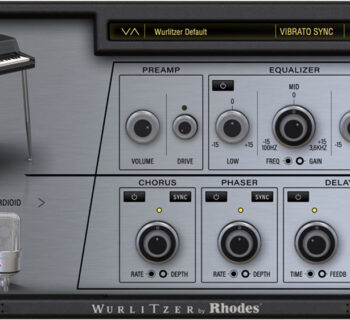
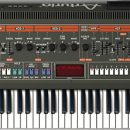
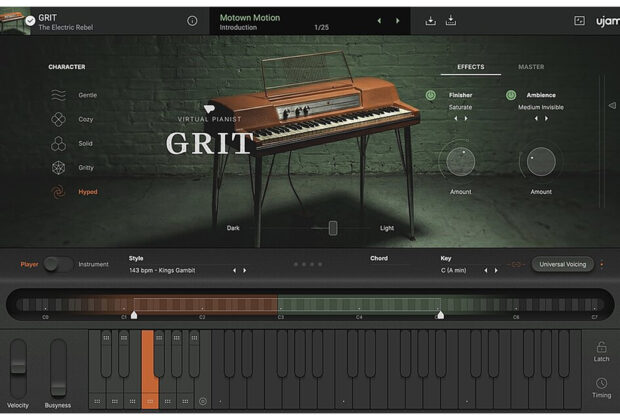
Once launched, the GUI consists of fiver character selections on the left (gentle, cozy, solid, gritty, and hyped) a visual recreation of the Wurlitzer 120 in the center with a dark and light slider, and to the right are the effects and master selectors. As you can probably guess, the character controls the smoothness or bite of the sound, regardless of whatever preset you may have selected (and yes, you can create and save your own). The Dark/Light slider controls the brightness of the sound, and as you slide it, the spotlight on the graphical piano gets brighter or darker to correspond with the slider position. To the right of this are the effects and master sections.
The effects are represented by the Finisher”label, and are divided into three categories: color, transform, and remix. Color contains choices such as chorus, phaser, and compression; transform contains choices for amps, drive, fuzz, and the interesting padifier which changes the sound to, well, a pad; remix has choices for filters and modulation. Unfortunately, you can only use one of these at a time.
The master section is represented by the Ambience label, and is also divided into three sections: rooms and reverbs, echo and delays, and combinations. These are self-explanatory, and similar to the effects, you may only use one at a time. Both the effects and master sections have a virtual knob to control the amount of effect, and a green button can be utilized to toggle the effect on or off completely.
Below this is the very important toggle button between player and instrument. Instrument means you do the playing. Player means the virtual pianist will do the playing for you, based on the pattern and preset.
How do you use the player? Very similar to guitar plug-ins we have explored, actually. After you pick your preset, you can use your left hand to choose which pattern variation, and your right hand to determine the notes. A color-coded keyboard is part of the GUI that shows you where these locations are. A nice touch is that there are dots on the bottom of the pattern keys, and these dots can be dragged to your DAW track as MIDI data, instantly placing the notes into your composition. Another cool feature is the Busyness slider, to the left of the keyboard; it determines the complexity of the pattern you have chosen. There are also latch and timing controls, allowing you to do half or double time, adjust swing and humanization, and adjust sync to song position or note on. If you think about this all together, it makes sense. The Wurlitzer 120 has a sound the lends itself well to rhythmic patterns, and in a way can be used as a rhythm guitar. Grit lets you get up a running fast to do this! Of course, it can be melodic too, and putting Grit into instrument mode allows it to be played traditionally.
As always, the question is, “How does it sound”? While we don’t have a Wurli 120 at our disposal, we do know the Wurli sound from our 200a, and of course, there are recordings (including the Ray Charles tune mentioned earlier) that demonstrate the sound. We think that for the specific Wurli 120 sound, this is right on. The GUI is purposely simple with somewhat limited choices to get you going fast, yet there is enough variety to cover a great deal of sonic territory. The presets Motown Motion, Crushed Dream, and Bandmate on Caffeine are just a few wonderful examples of what is possible sonically.
Should you need help understanding the plug-in, the manual is available by clicking on the information circle in the left side of the UI. While well written, it also include the other virtual pianos in the series, not just Grit. The assumption, of course, is that you have several plug-ins! Having enjoyed this one so much, we just might find ourselves exploring others!
Virtual Pianist Grit has a MSRP of $129.00 if it is your first Ujam purchase. However, if you have other Ujam products, you will be eligible for a loyalty discount, dropping the price to just $49.00. We think at the loyalty price, it is a no-brainer: you get a virtual re-creation of a hard-to-find instrument that sounds good and is easy to use, and, should you choose to utilize it, a great player system to help compose with.
Your decision gets a little murkier at full price, as there are Wurlitzer 200a recreations that give you more options for less. But again, this is not a Wurlitzer 200a. It is a 120, and the other plug-ins don’t have the player technology either. If you’re looking for something a little different, though, this may be right up your alley!
ujam
www.ujam.com