| Category | Value | Rating |
| Features | 35% |  |
| Usability | 35% | |
| Sound | N/A | - |
| Documentation & Support | 10% | |
| Price | 20% | |
| OVERALL RATING = 3.5 Stars (out of 4) 3.6 stars or better: Outstanding, WIHO Award 3 stars or better: Worth considering 2 stars or better: Suited to specific needs 1 star or less: Not recommended |
||
The Roland A-88 mkII proves to be a highly capable MIDI controller, particularly for players who prioritize feel and expressive performance. Its PHA-4 keybed is one of the best we’ve tested, and when paired with MIDI 2.0-compatible software, it delivers a level of nuance that noticeably elevates the virtual instrument experience.
There are a few usability quirks—most notably the lack of an onboard display, reliance on button combinations, and some limitations in software integration—but none of these overshadow the core strengths of the instrument. For keyboard players seeking a premium playing experience with strong hardware and software integration capabilities, the A-88 mkII is well worth consideration.
Features
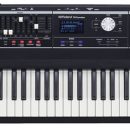
The Roland A-88 mkII is an 88-key MIDI controller featuring Roland’s PHA-4 Standard hammer-action keybed with ivory-feel keytops and escapement. It supports release velocity, though aftertouch is not included.

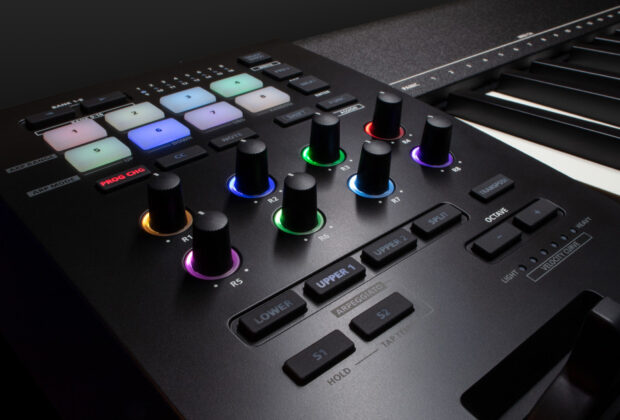
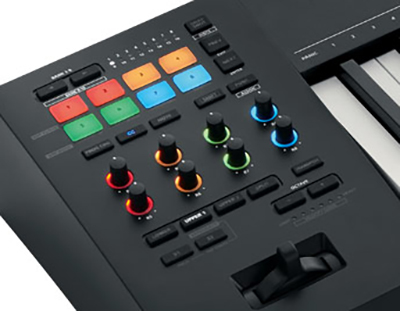 All physical controls are located on the left side of the keyboard and include eight rotary knobs, eight velocity-sensitive pads with multicolor backlighting, and additional buttons for MIDI control functions. The controller also includes Roland’s pitch/modulation lever, combining pitch bend and modulation along two axes.
There is no onboard display. Parameter adjustments are made using a function button in combination with other controls or assigned keys, with printed labels above the keyboard indicating functions such as MIDI channel selection, layering, and arpeggiator settings.
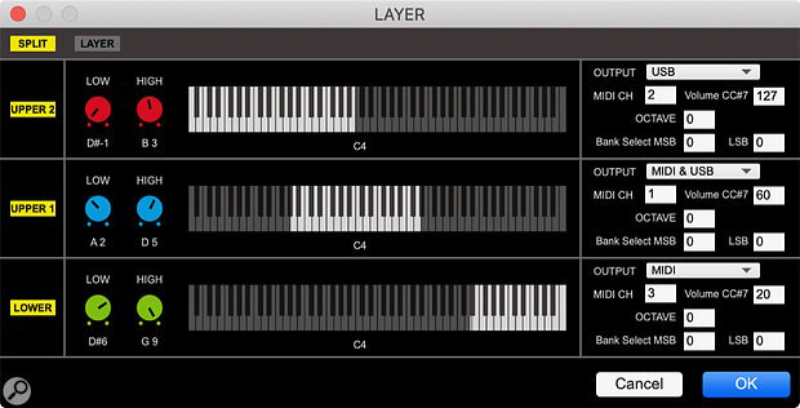
The controller supports three zones (Lower, Upper 1, Upper 2), which can be configured using the downloadable A-88MK2 Control software. This software allows graphical editing of splits and layers, as well as MIDI routing via USB, DIN, or both simultaneously.
The arpeggiator operates on the Upper 1 zone and includes Up, Down, Up/Down, and Random modes. Tempo can be set via tap tempo or external MIDI clock.
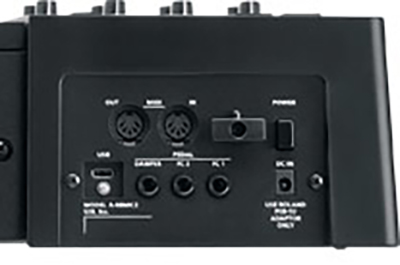
The rear panel includes a USB-C port for data and bus power, three assignable pedal inputs (Damper, FC1, FC2), and an AC power input. The controller supports VST, VST3, AU, and AAX environments via connected systems.
Snapshot functionality allows storage of up to eight configurations for quick recall.
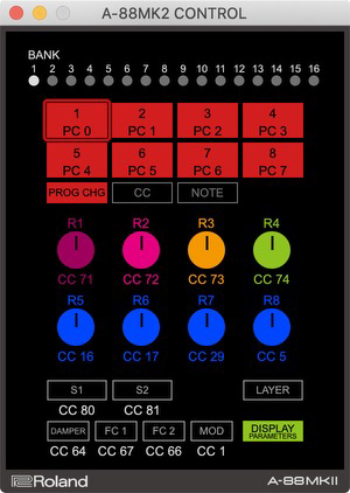
The software windows look like so:
Usability
We began by updating the firmware, as MIDI 2.0 functionality requires version 2.0 or higher. The update process itself was straightforward using Roland’s downloadable tools. However, checking the firmware version required powering on the unit while holding a button and interpreting LED patterns. While functional, this approach felt dated, particularly given that the companion software alarmingly did not display firmware information.
We then paired the A-88 mkII with Synthogy’s Ivory 3 virtual piano. Before even addressing MIDI functionality, the keybed stood out immediately. The feel is highly piano-like without being overly heavy, allowing for both expressive playing and fast passages. Even during extended sessions, we did not experience the fatigue that can occur with heavier actions. The textured keytops further enhance the playing experience.
Initially, we did not notice any difference in expressiveness compared to other controllers—until we realized the unit defaults to MIDI 1.0 mode. After restarting in MIDI 2.0 mode, the improvement was immediately apparent. Dynamic response became smoother and more natural, particularly when transitioning between soft and loud passages. In combination with Ivory 3, and additionally playing with Pianoteq 9, this resulted in one of the most satisfying virtual piano experiences we’ve had in quite some time, and possibly the best so far!
It’s important to note that MIDI 2.0 benefits require compatible software. Without it, the controller operates in MIDI 1.0 mode.
We also tested the A-88 mkII in a hybrid setup, controlling both software instruments via USB and hardware synths via DIN simultaneously. We connected the DIN5 MIDI out of the A88 mk2 to the MIDI In of our Prophet 12, while simultaneously connecting the USB-C cord to our computer. This worked seamlessly. Program changes using the pads functioned immediately with hardware, changing patches on our Prophet, and the Prev/Next buttons allowed for easy navigation of presets, too. This significantly improved our workflow, particularly in studio environments where multiple devices are in use.
On the software side, MIDI learn worked reliably across plug-ins. However, we were unable to use Program Change functionality to switch presets within any plug-ins (using Pro Tools). Even with Roland’s own software instruments, preset navigation was not MIDI-assignable in this way. This represents an area where deeper integration could improve the overall experience.
The A-88MK2 Control software is a valuable addition, making it much easier to configure layers, routing, and assignments. However, the interface is limited to a small, non-resizable window, which felt a bit too restrictive.
Documentation and Product Support
All required software and documentation are available through Roland’s website. The manuals provide the necessary information to operate the controller, though certain sections required multiple readings for clarity. This is generally consistent with previous Roland documentation.
Price
The Roland A-88 mkII ($1,249 MSRP) sells for approximately $1,250. It is priced higher than some competitors, though lower than others in the premium controller category.
The cost reflects the quality of the keybed, which is a primary strength of the instrument. While additional features such as bundled software or an onboard display could enhance overall value, the core performance and build quality justify the price for players focused on feel and expressiveness.
Additional Comments
We do wonder if bundling some software (a Roland Cloud plug-in?) might make this a better deal for some, as other companies often bundle software with their hardware. Additionally, not having a screen on the keyboard itself seems like a missed opportunity to make things easier for users, especially given the not-so-entry-level price. But you will definitely need the manual as all functions are not obvious. Having all controls on one side as opposed to at least some being centrally located (especially when there is plenty of space) also may not be everyone’s cup of tea. Additionally, the software is great in many areas but still seems like it could be refined further—a sizable window, showing the firmware revision, for example. As we said earlier, the action felt great, and basic controls work really well. That alone has us thinking about keeping it. If those previously mentioned items don’t bother you, you might be thinking about keeping it too!
Contact Information
Roland
www.roland.com