| Category | Value | Rating |
| Features | 20% |  |
| Usability | 25% |  |
| Sound | 25% |  |
| Documentation & Support | 10% | |
| Price | 20% |  |
| OVERALL RATING = 3.5 Stars (out of 4) 3.6 stars or better: Outstanding, WIHO Award 3 stars or better: Worth considering 2 stars or better: Suited to specific needs 1 star or less: Not recommended |
||
We have reviewed Nord keyboards for nearly 20 years, and each new generation of product does a great job of refining features and enhancing the sound. Staying true to that theme, Nord has released the Electro 7, a keyboard that features a piano section, an organ section, and a significantly upgraded synth section from the previous model.
Also featuring a new panel design with a larger color display, physical drawbars on all models, a Pitch Stick and Modulation Wheel on the 73 and HP models (not the 61 key model), a new virtual analog synth engine, and a new 73-key Kawai Triple Sensor Hammer Action keybed on the HP model (that still weighs less than 30 pounds!), there’s a lot to like! All said, it’s still red, it still sounds great, and it will still cost you a lot of cash. Fortunately, it’s still wonderful. Even more than before.
Features
The Nord keyboard lines have gotten a little confusing over the years, especially given all the crossover between line capabilities. Pianos with synth sounds. Synths with samples. Organs with a mix, and so on. Somewhat simplified, here’s a breakdown of the different lines:
| Nord Line | Primary Focus | Sound Engines Included | Keybed Action Options | Key Strengths & Capabilities |
| Nord Stage | Ultimate live performance flagship | Piano, Organ, & Wave 2 Synthesizer | Hammer Action (HA) or Semi-Weighted Waterfall (Compact) | Extensive multi-layering, independent effects per layer, seamless transitions, physical drawbars. |
| Nord Electro | Electromechanical vintage keyboard emulation | Piano, Organ, & Basic Sample Playback (New VA engine in Electro 7) | Semi-Weighted Waterfall (SW) or Hammer Action Portable (HP) | Lightweight, hyper-realistic Rhodes, Wurlitzer, and B3 Organ emulations, Virtual analog, streamlined effects for gigging. |
| Nord Piano | Premium stage piano experience | Piano & Basic Sample Playback | Virtual Hammer Action (Weighted) | Triple-sensor keybed for realistic response, dynamic pedal noise, optimized for pure piano players. |
| Nord Grand | Premium acoustic piano feel | Piano & Basic Sample Playback | Kawai Responsive Hammer Action with Ivory Touch | Top-tier acoustic piano keybed action, tilted control panel layout, designed for studio or home realism. |
| Nord Lead / Wave | Dedicated synthesizer creation | Virtual Analog, FM, Wavetable, & Samples | Synth Action (Unweighted) | No acoustic pianos or organs; deep sound design, modulation matrices, arpeggiators, and multi-timbral synth layers. |
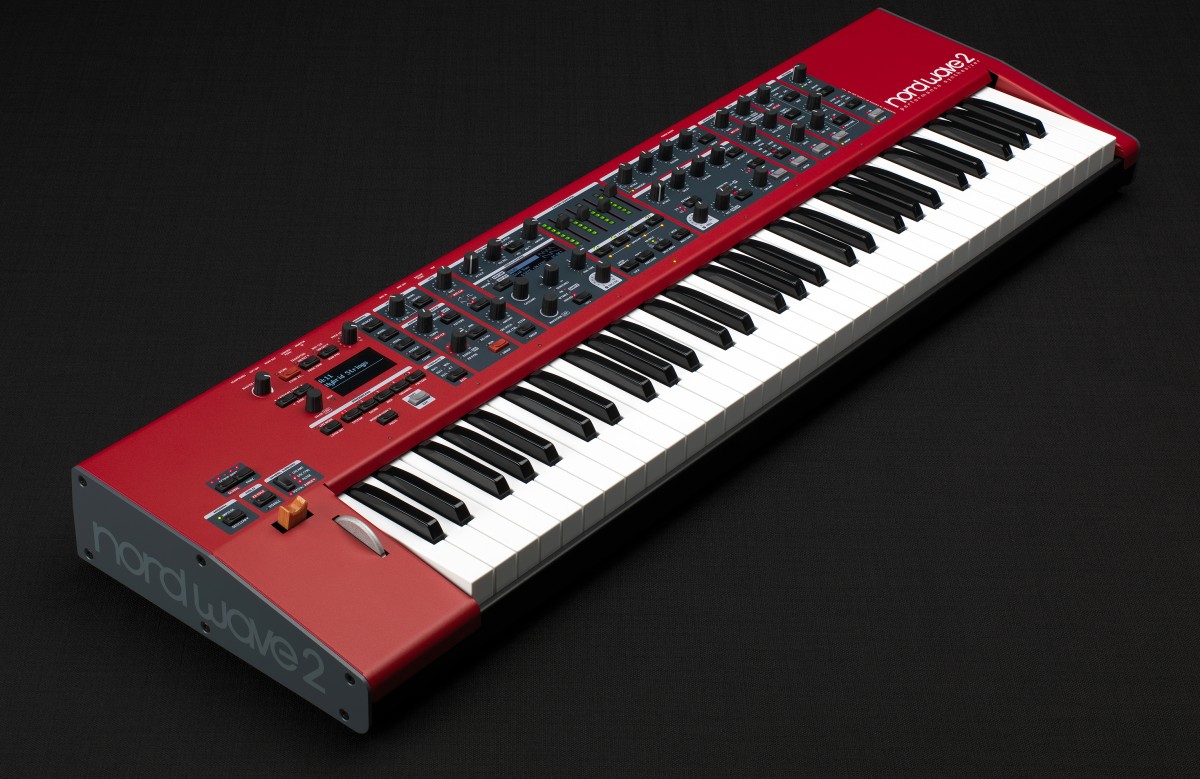
The subject of this review is the Nord Electro 7 HP: the 73 key model with the Kawai Hammer Action (OS version 1.1). The Electro line historically has had a focus on electromechanical pianos, such as the Rhodes, Wurlitzer, and Hammond B3 organs; it also included other organs (i.e., Vox and Farfisa), acoustic pianos, Mellotron samples, and with the Electro 6 (released in 2018), 512 MB of memory for synth samples. (The Nord Sound manager is downloadable from the website and allows you organize and download samples to your instrument.)
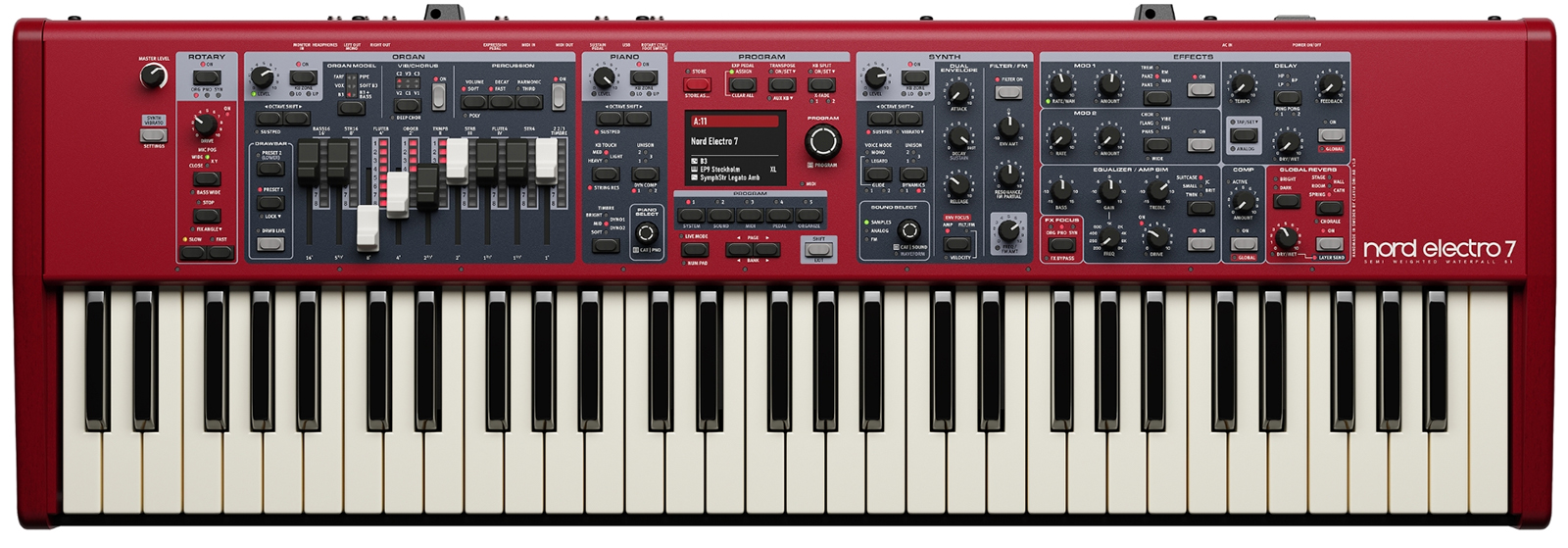 Simply put, the Electro 7 is a big upgrade from the Electro 6. The main differences are:
- A Real Synth Engine: The Sample Synth section on the Electro 6 was limited to playing back loaded samples with basic envelope controls. The Electro 7 upgrades this to a virtual analog engine. It adds analog waveforms, FM synthesis, dual ADSR envelopes, a resonant low-pass filter, mono legato, and glide modes.
- Independent FX Processing: On the Electro 6, you had to share most effects across your split or layered sounds. The Electro 7 gives you isolated effect chains for the Organ, Piano, and Synth layers. It also inherits premium algorithms like the "Chorale Reverb" from the Nord Stage 4.
- Better Physical Feedback: All Electro 7 models feature physical drawbars paired with LED light strips. When you switch patches, the LEDs immediately update to show the digital settings of the organ—solving a major user workflow complaint from previous generations.
- Performance Expression: The 73-key variations of the Electro 7 finally feature physical pitch and modulation controls. Additionally, the expression pedal can now be dynamically assigned to modulate active synth parameters (like filter frequency) rather than just volume.
- Upgraded Keybeds: The weighted portable action version (Electro 7 HP) transitions to a refined triple-sensor Kawai hammer action keybed. This provides significantly better dynamic response and repetition speed for acoustic piano patches compared to the Electro 6 HP.
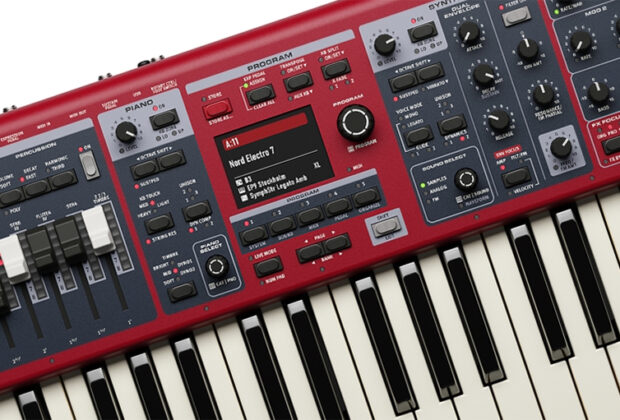
Centrally located is the color screen: four inches diagonally across, not touch sensitive. Directly to the right of the screen is a large encoder that also allows you to press down on it to select what is highlighted on the screen. Around the screen are other buttons to help you navigate menus and make selections, as well as five “Live” buttons that are best thought of as “favorites.” These are instant recall buttons to whatever you have saved there, useful for switching sounds on the fly during the gig. So useful, in fact, we think that doubling this (perhaps by pressing the Shift key to get Live selections 6-10?) would be welcome, especially given the pro level usage intended for this keyboard.
To the right of the screen are the synth and the effects sections, while to the left side of the screen is the organ section, including nine drawbars and useful buttons to swap between upper and lower drawbar controls. To the left of this are the extremely welcome pitch bend and modulation wheel, which were missing from the Electro 6. We were always surprised by this, because if the idea is to offer a synth experience, you kind of want those. Keep in mind, however, the 61-key version of the Electro 7 still lacks a pitch bend and modulation wheel.
Besides the five live mode (favorite) locations, there are 20 banks with 25 programs each, giving you 500 locations for sounds. You can choose a split point at nine locations, which will then be shown by a green LED above the keybed. As with all Nord keyboards, you have access to the Nord Sample Libraries, which allows you to load additional/different sounds. You are also able to load your own samples (in .wav or .mp3 formats), but you must prepare them in the Nord Sample Editor and then import them via the Nord Sound Manager. You have 1GB of sample memory available for piano sounds, and 512MB for other samples.
Getting back to the sounds, the Organ section uses the same engine from the Nord Organ 3, offering classic tonewheel, transistor and pipe organs, as well as the latest generation of the company’s rotary speaker emulation processor. The Piano section provides a selection of grands, uprights and electric pianos from the Nord Piano Library, includes newly added features including Dynamic Compression, Unison and Timbre. You get 120 voices of polyphony for Piano library sounds.
As previously mentioned, the synth section provides analog waveforms and FM synthesis along with high-quality samples from the Nord Sample Library. Mono, Legato and Glide playing modes are present, while a low-pass filter with resonance and dual ADSR envelopes for amp and filter/FM Amount offer previously not possible onboard sound-shaping options. The Electro has 30 voices of synth polyphony.
Finally, the Electro 7 now boasts a per-layer effects section that includes all-new reverb, delay, amp-simulation and modulation processors. In the effect section is a dedicated button to toggle between the layers.
Rounding out the back, you get two audio outputs, one monitor input, one headphone output, one expression pedal input, one sustain pedal jack, a rotary control/foot switch jack, traditional 5-pin DIN MIDI In and Out connectors, a USB type B connector for USB MIDI, software updates and sound transfers, and an IEC power cord connector.

Usability
When we first got the Nord Electro, of course we spent some time playing it… and then realized it was running OS 1.1, and at the time of this review, it is up to OS 1.3. Updating was incredibly easy: just download the updater from the website, connect the keyboard to your computer via USB, and run the program. Quick and efficient!
So how do you get around this thing? The central area looks like so:
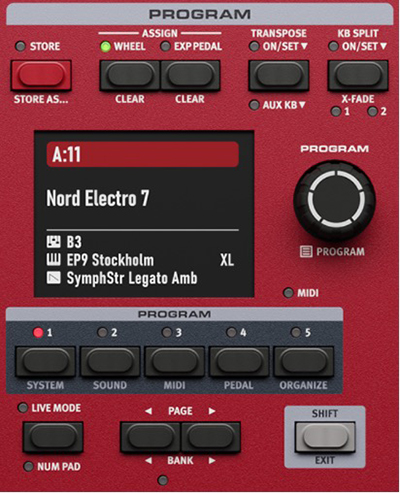
Turning the program knob of course will scroll through the various presets in sequential order, and at first glance, the programs may seem a bit disorganized. But when you look at it from the perspective of each page has access to five programs at a time, it’s actually quite methodical! The sounds are arranged per page so that you have an acoustic piano in position 1, an electric piano in position 2, an organ at 3, and synth sounds in positions 4 and 5. And to make finding sounds even easier, when you press the Program encoder button, you then get to choose presets by number, alphabetical order, or sound category. Nice!
Moving to the synth section, the synth section looks like so:
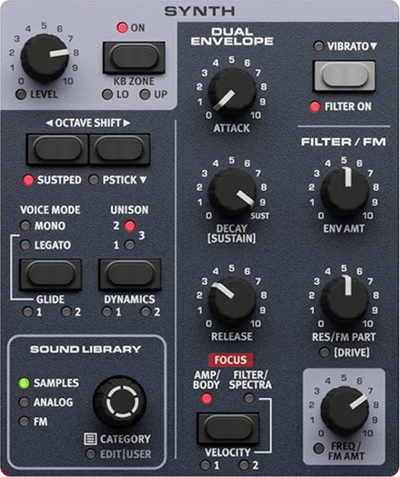
It is here you can see the hands-on knobs for the envelope: Attack/Decay/Sustain/Release, something the Electro 6 did not have. (You control Sustain from the Decay knob by first hitting the global Shift key) This was great for on-the-fly adjustment of sounds, and really made the synth section infinitely more useful! We also liked the dedicated button for vibrato for the synth sounds, as it allowed for further liveliness and motion to a given preset (or if used in large amounts, a bit of weirdness, which was fun). While simple by comparison to other dedicated polysynths, the hands-on controls here really elevate the synth experience in this keyboard.
The Organ section looks like this:
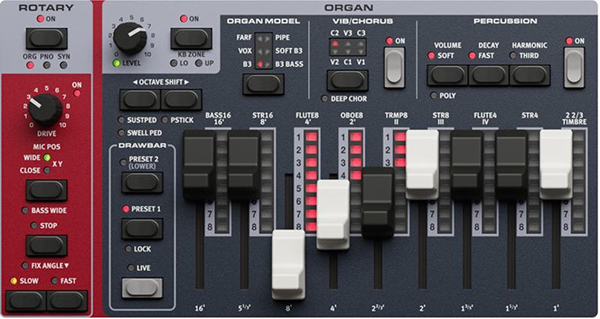
Nord is long associated with great organ sounds, and the Electro is no different. There are presets for B3, B3+Bass, Soft B3, Vox, Farfisa and Pipe models with full polyphony, and we found it very easy to navigate this section as everything is well labelled. The drawbars had a good feel to them, and on a dark stage having each drawbar accompanied by a corresponding LED ladder is welcome. Hands-on control for overdrive, percussion, and Leslie speaker rotating speed are all there, and we particularly liked the ability to switch microphone positions on the fly with dedicated buttons.
The Effects section looks like so:
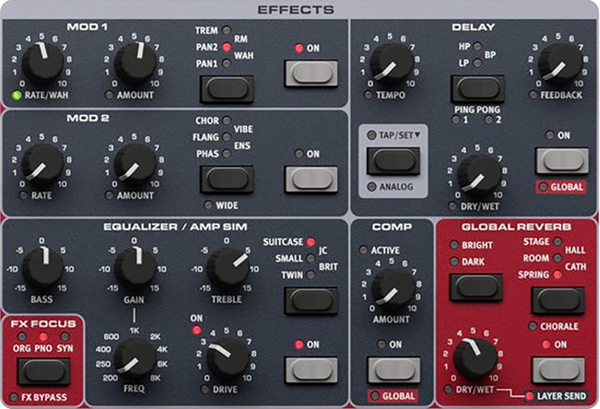
Once again, very easy to get around, as everything is labelled and pretty self-explanatory. We did want to point out, however, what is present in the bottom left corner: the FX Focus button. This allows you to assign effects to each section—piano, organ, and synth—independently of each other, another cool update that previous Electros could not do.
Speaking of getting around, let’s talk about how much we liked the new Kawai keybed. It felt very piano-like without a heavy action, allowing for playing fast synth passages without issues. A small quibble is that we would have like slightly more texture to the keys, but they didn’t feel as slippery as some other keyboards we have played. In all, we felt this is a high-quality keybed that serves piano and synth passages equally well.
Sound
Historically, Nord keyboards sound great… and guess what? This one does, too! We do have some criticisms worth mentioning, but we’ll start with the good. Unsurprisingly, the Electro’s historically strong points—organs, pianos, and electromechanical pianos—are still strong. Rhodes, Vox, Hammonds, Wurlis, CP70s, are there and sound great. And when they’re not to our liking, we found it easy to make adjustments. For example, we thought the CP70 preset was too stingy on the chorus effect until we increased it enough to bring us into the land of Phil Collins and Genesis. Given that this is the seventh generation of the Electro, it is safe to say it nails your classic keyboard sounds.
But what about the new synth section? Well, while the hands-on controls are great, the original preset sounds themselves are more bread and butter-quality sounds, good for getting the job done, but nothing that will stop you in your tracks. There are a good variety of pads, leads, strings, synth brass and basses, and with OS 1.3, a new supersaw waveform. However, it needs to be made perfectly clear this is only part of the story.
There is an entire Nord Library of sounds to get additional timbres and/or replace your presets. This is where we did get excited about the synth sounds, as going through the online library, we found in the synth section some interesting and cool (to us!) sounds, derived from classic Oberheims (some clearly derived from Prince’s use of them) and even some classic Roland synths. Of course, your personal style and taste may vary, but that is one of the things that makes Nords so versatile: you can load it up the way you want. Additionally, though there are memory limitations, and it has to be the right format (as discussed previously), you can use your own samples, so leave your vintage CS-80 home!
One thing that would really enhance the synth section would be an arpeggiator. Perhaps the Electro 8?
Given the presets, the additional library available, and the ability to import your own samples, there really is something here for everyone.
Documentation and Support
The Electro 7 comes with a printed manual, which we thought was clear and well written. It includes some nice diagrams of sound shaping and some historical information about the various original instruments. There are some videos on the website, too.
Price
The Nord Electro 7 sells for $3,299 USD for the 61‑key model, $3,599 USD for the 73‑key semi‑weighted waterfall, and $3,999 USD for the HP 73‑key Kawai Hammer Action model (the one we reviewed).
While you are getting great sounds, a great feeling keyboard, and a great deal of flexibility with the online library and the ability to use your own samples, Nord keyboards are at the high end of the price range. You can get full-blown workstations for similar prices, and stage pianos for less. But if you want a rugged, stage-ready performer with great sounds and a performance-streamlined interface, you can’t go wrong here.
Contact Information
Nord
nordkeyboards.com