| Category | Value | Rating |
| Features | 20% |  |
| Usability | 25% |  |
| Sound | 25% |  |
| Documentation & Support | 10% | |
| Price | 20% | |
| OVERALL RATING = 3.7 Stars, which earns it a WIHO Award! 3.6 stars or better: Outstanding, WIHO Award 3 stars or better: Worth considering 2 stars or better: Suited to specific needs 1 star or less: Not recommended |
||
The first version of Yamaha Montage was released in 2016, while the MODX, a lower-cost version of the Montage, was released in 2018. If you're curious about the history, you can check out our reviews of these older synths here:
Yamaha Montage 6 Synthesizer (OS 1.5)
Briefly, the Montage combined two independent sound engines, AWM2 (waveform and subtractive synthesis, from the highly regarded MOTIF series) and FM-X (a modern take on Frequency Modulation synthesis, from the classic DX-7 synth), and introduced a cool new performance feature called Motion Control, which provides an interesting way to control modulations and alterations of sounds in real time via the “Super Knob” or a connected expression pedal. The initial cost of the Montage was $4,000, so the MODX was a welcome lower-priced option, which retained many features of its bigger sibling.
 Both lines have undergone several updates over the years, and we now have the MODX M series. Yamaha has significantly upgraded the MODX, which now has an additional third sound engine, the AN-X: a 12-voice, virtual analog modeling engine. With increased polyphony, increased user memory, more physical controls, an upgraded keybed, and a built-in USB interface that supports MIDI 2.0, there is much to like about this synth. And best of all, it remains significantly cheaper than the Montage! Even better, registered users gain access to download the ESP MODX: a plug-in that completely recreates your MODX M on your computer without requiring the hardware to serve as a dongle, so when you can’t bring the keyboard itself to the stage or studio, you can bring it on your laptop. We think this synth is going to interest a lot of people!
Features
The MODX was already a great-sounding, impressive synth. Perhaps the obvious next question is, “well, what’s new?” The short version is: an upgraded processor for faster UI navigation, expanded memory, updated/increased front-panel controls, and a new synth engine. As we have previously reviewed the MODX (see above), much of this review will be focused on the differences between the original MODX and the MODX M. Starting with the Sound Engine and Polyphony:
- AN-X Engine: The MODX M8 adds Yamaha's AN-X (Analog Behavior Modeling) sound engine, which recreates the sound of analog synthesizers. This is a 12-voice engine.
- Polyphony: The MODX M8 features up to 268 notes of polyphony across its three engines (AWM2, FM-X, and AN-X), compared to the 128-note total polyphony of the original MODX 8.
- Expanded Waveform Memory: The MODX M8 features 10.7 GB of AWM2 preset memory and 1.9 GB of user flash memory—roughly double the capacity of the original MODX 8 (5.6 GB preset)
The AWM2 sound engine is based on multi-samples. More specifically, this engine is Yamaha’s proprietary, sample-based, subtractive synthesis engine. Briefly, a single AWM2 sound (called a Part) is made up of multiple building blocks called elements. Previously, an AWM2 sound Part was limited to eight elements. The MODX M increases this capacity to 128 Elements per Part. This allows for more complex and more realistic sounding sounds. The engine features 128 notes of dedicated stereo/mono polyphony specifically allocated for AWM2, which operates entirely independently of the FM-X (128 notes) and AN-X (12 notes) engines.
The FM-X sound engine, not surprisingly, is based on FM synthesis (think: Yamaha DX-7) with eight operators. Although the MODX M uses the more advanced FM-X engine, it remains backwards-compatible with six-operator FM patches from classic DX and TX series synthesizers. You can actually load SYSEX files from these classic synths by using Yamaha’s FM Converter web application and then loading via a USB drive. The link to the converter can be found here. You can stack up to eight DX-7 sounds simultaneously, making it like the Yamaha TX816 (a rack-mounted 1984 system that was essentially eight DX-7s in a rack). Having these original sounds utilize the MODX M’s effects and Super Knob capabilities allows for sonic possibilities not possible previously—and it allows you to keep your vintage gear at home too!
The AN-X engine is Yamaha’s virtual analog synthesis engine, using digital modelling. An AN-X Part features three main oscillators, a noise generator, and five core waveform choices. Oscillators 1 and 2 feature five selectable basic waveforms (Sawtooth, Square, Triangle, Sine, and Pulse), while Oscillator 3 can act as a flexible modulator. The MODX M supports up to 12 simultaneous notes for the AN-X engine, compared to 16 notes on the Montage M, but are otherwise the same engine. Interesting inclusions are parameters like oscillator drift and aging to mimic the pitch instability of old hardware components warming up. The engine is fully integrated into the Motion Control system, but you will tweak it using the MODX M’s four physical (assignable) knobs instead of the Montage's 8…
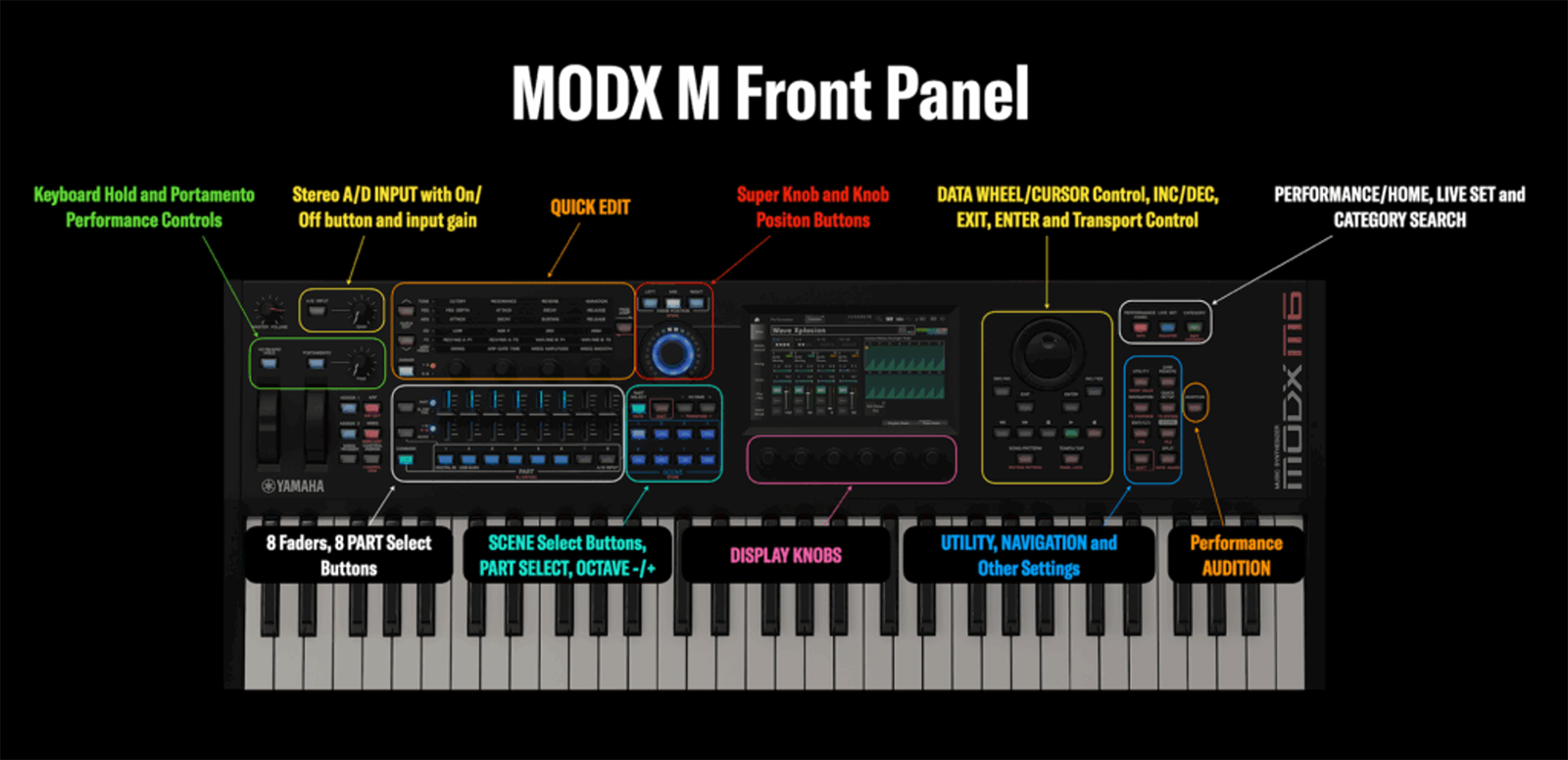
…which is a great segway to the control panel. As the saying goes, “With great power comes great responsibility,” or in this case, a way to control it! Fortunately, the MODX M has increased the hands-on controls of the front panel, allowing for less menu diving and a better experience with all that’s going on under the hood.
Original MODX 8 |
New MODX M8 Improvements |
| Physical Faders
4 Sliders (toggle to see parts 5-8) |
Physical Faders
8 Sliders (Direct 1:1 control for Parts 1–8) |
| Fader Direction
Standard volume tracking only |
Fader Direction
Drawbar Mode (Inverted tracking for classic organs) |
| Part & Scene Select
4 shared buttons (Needs page switching) |
Part & Scene Select
8 Dedicated Buttons for each separately |
| Display Knobs
None (Screen-only adjustments) |
Display Knobs
6 Physical Knobs underneath the touchscreen |
| Control Resolution
Standard MIDI resolution (128 steps) |
Control Resolution
High-Resolution Encoders (Smoother parameters) |
| Performance Keys
Left-hand pitch/mod only |
Performance Keys
Added Keyboard Hold & Portamento hardware keys |
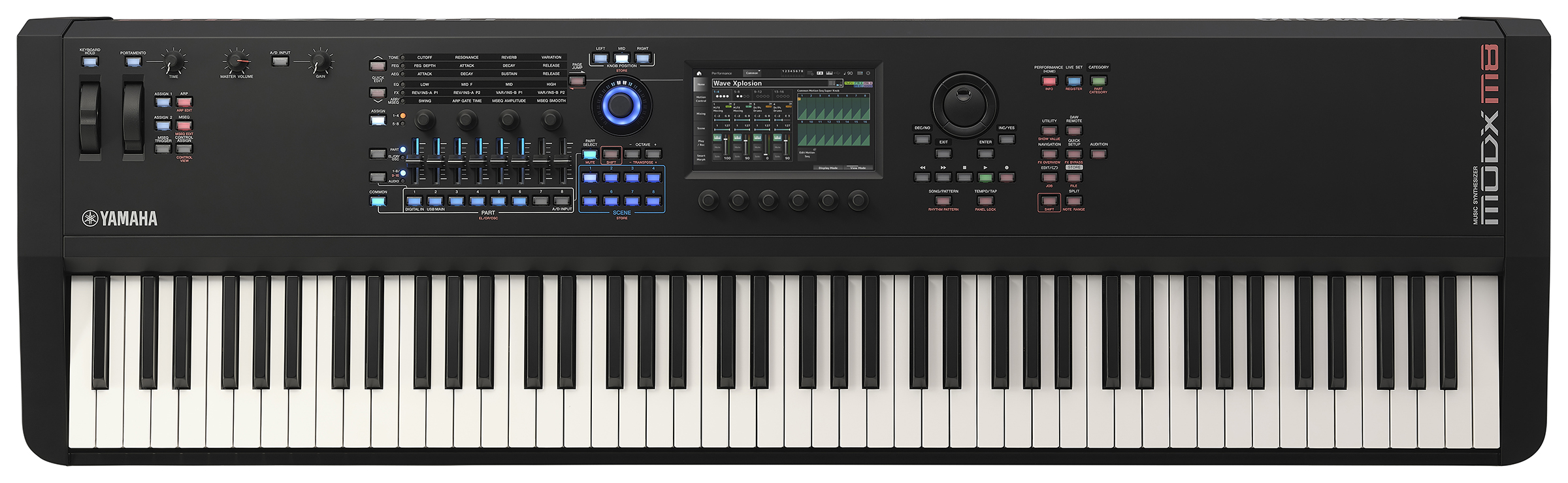
The display is a 7" TFT color, wide, VGA LCD touch screen (located centrally, above the six dedicated knobs).
Additionally, there are now Super Knob shortcuts. There are three dedicated positioning buttons to instantly snap the Super Knob to the Far-Left, Center, or Far-Right positions without rotating it manually. This is great to quickly get to a given parameter or value without spending all that time spinning a knob.
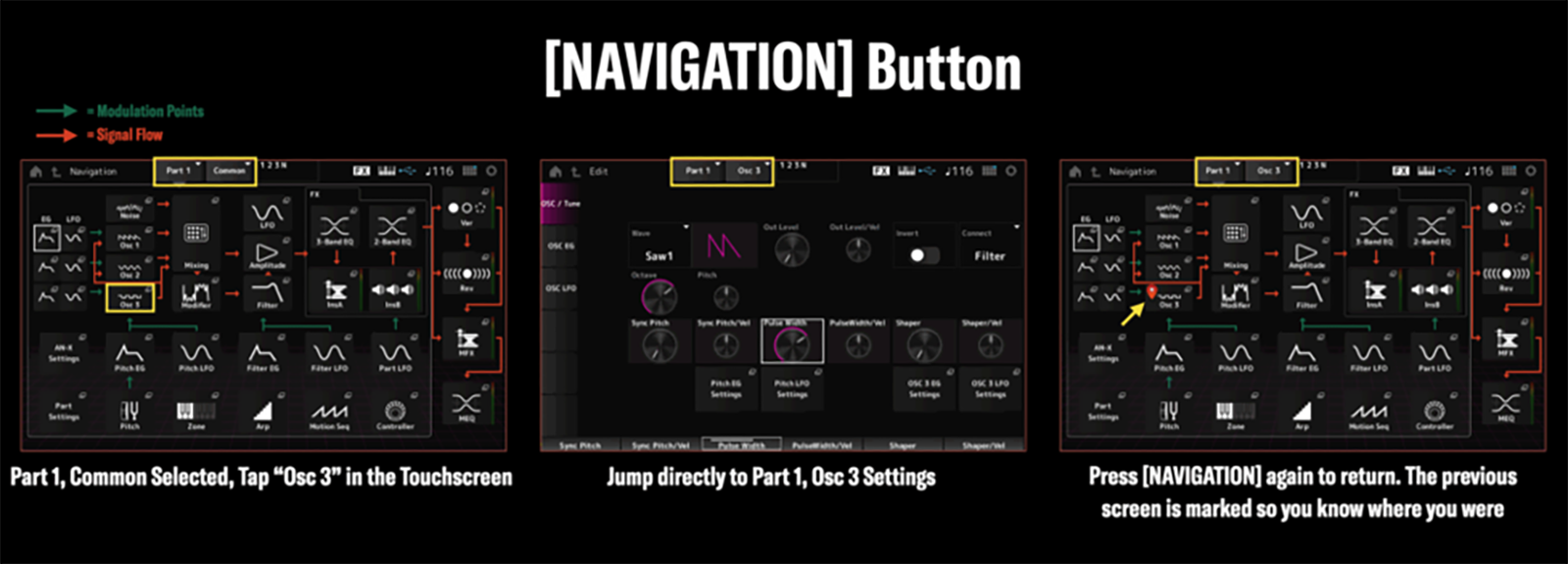
There is also a new Navigation button. Pressing the Navigation button when on the Home screen displays an overview of the sound's structure, signal routing, and modulation points. It also highlights your last-used setting with an orange dot for quick recall. Alternatively, if you select an individual Part and press the Navigation button, it shifts focus to the specific parameters (like filter and amplitude screens) for that chosen Part. The screenshots below show how Navigation works with a single AN-X Part. Note the arrows showing Modulation Points (green arrows) and Signal Flow (orange arrows):
Before we dig into all the controls, let’s start with the keyboard itself. While both the original MODX 8 and the MODX M8 utilize Yamaha's Graded Hammer Standard (GHS) weighted action, the M8 features an updated mechanical revision. It reduces the initial resistance felt on the original MODX8 and provides a more positive “soft stop” at the end of the key travel, making it feel, to some, less spongy. While the MODX M8 is still not as elevated as the Montage M keybed, it is a welcome upgrade and overall feels good to play. We only wish there was a little bit of texture to the keys, but we suspect this would add cost and/or encroach on Montage territory. There is no aftertouch, unfortunately—another feature left to the pricier machine. However, the upside is that this synth weighs just under 30 pounds! That’s a fair balance of weighted keys without the weighted synthesizer!
Getting back to what’s under the hood, The MODX M8 features studio-grade processing architecture built around 88 distinct effect types. Its processing matrix is split into three core signal stages: Insertion, System, and Master effects, allowing you to design specific sounds for individual instruments or apply global processing to your entire live mix. A quick summary of the effect routing structure:
- Insertion Effects (A and B): Each individual performance Part (such as a piano or synth) can have two independent, dedicated effect blocks. You can route these block pairs in series or parallel.
- System Effects (Reverb & Variation): These function like auxiliary buses on a traditional mixing console. All Parts can feed into a shared high-definition Reverb or a secondary Variation effect (like a global delay or chorus) via independent Part send controls.
- Master Effects & Master EQ: The absolute final stage of the audio chain before the physical outputs. This applies global multi-band compression, normalization, or correction equalizations to the entire mix to fit the venue acoustics
The MODX M8 provides a total of 12 Insertion Effect blocks simultaneously. Parts 1 to 8 each receive a permanent, dedicated dual-effect block layout; Parts 9 to 16 share four remaining, freely assignable insertion effects blocks, requiring you to prioritize effects when building large multi-layered performances. Also featured in the Montage M, the MODX M uses Virtual Circuit Modelling, put to good effect (pun intended) for emulating analog delays, flangers, phasers, and rotary speakers. Like most things on the MODX, effect parameters can be assigned to the Super Knob for real time control.
Speaking of real-time control, we need to mention the impressive arpeggiator. The MODX M8 runs up to eight completely independent arpeggiators concurrently across different instrument layers. Incredulously, there are nearly 11,000 (that’s NOT a typo) preset patterns, and Phrasing allows realistic-sounding things such as guitar strumming and drum ghost notes. It almost seems like KARMA without the name brand. This is all controllable via the Super Knob, so there’s a lot of movement that’s possible!
Separate from this a Sequencer which can record up to 16 independent MIDI channels simultaneously, with a total internal capacity of 130,000 notes per individual song file. We have come a long way from the once-revolutionary Korg M1 whose sequencer held an incredible (for the time) 4,400 notes! Sections can be mapped to the physical Scene buttons and then be chained together if desired. A nice feature is that individual instruments can have different loop lengths. For example, a drum groove can loop continuously at 4 bars while a complex keyboard solo records over 32 bars. A nice touch is that while looping, pressing the record button activates Rehearsal Mode to test out musical ideas without burning them into the track. Holding Shift along with a key instantly clears accidental notes from the loop on the fly. This is a nice way of testing out new ideas to hear how they sound.
Ports in the back include a stereo headphone jack, a pair of quarter-inch unbalanced jacks for the main stereo mix output, dual input jacks for inputting external gear directly through the internal effects (including a vocoder!), a USB to Host port to connect to a computer, USB to Device port for USB storage drives or secondary MIDI controllers, and traditional five-pin DIN MIDI In/Out jacks. There are also dual foot controller inputs, a dedicated sustain foot switch, and one input for an assignable foot switch. Sadly, power comes via an external wall wart located in the middle of the cord.
Once you register the hardware into your Yamaha account, you get free access to ESP, the MODX M plug-in. To get it, you are required to download and install the Steinberg Download Assistant, log into it, enter the code that came on a sheet of paper with your MODX M hardware, then download and install the plug-in from within the Steinberg Download Assistant. It runs as a VST3 or Audio Units (AU) plug-in inside major recording software on the Mac and PC. There is no version for AAX (Pro Tools), but we did find a way to get around that limitation using a VST wrapper (but more on that later)! Fortunately, the ESP plugin will run without needing to have the hardware MODX M connected as an oversized dongle (yes, we had the same question too!). The intention here is to give you access to your sounds when you don’t have access to your keyboard (like on a fly date).
The MODX M2 utilizes MIDI 2.0! This is particularly significant for players using the keyboard to control plug-ins such as Ivory 3 or Pianoteq that recognize MIDI 2.0 messages, allowing for very expressive playing to be captured.
Tip: To use MIDI 2.0, you must configure the internal USB settings on the keyboard. You can do this by navigating to Utility > Settings > Advance, and turning the Legacy USB Driver Mode to Off.
In addition, the Yamaha MODX M8 features a built-in, multi-channel, USB audio interface that provides 10 outputs and four inputs. However, to get this number of channels, you would need to use a sample rate of 44.1 kHz; increasing the sample rate to 96kHz gets you a single stereo pair in each direction.
Usability
When we first received the MODX M8, of course we were eager to check it out. After the initially noodling around with sounds, we realized we needed to be sure we had the most recent OS for review. It’s a good thing we checked, as our MODX came with OS 1.0, a far cry from current version, 3.0. To update, you need to download the firmware from Yamaha, decompress it, put in on a USB drive, then turn on your MODX (with the USB stick already inserted) while pressing the Utility button and the Cursor Up button.
At first, we weren’t sure which was the Cursor up button, as there are a few buttons that could serve this function; we finally discovered the correct button is the button above the thumbwheel dial, just to the left of the Utility button. Also, the firmware update itself is nearly 4GB, and Yamaha recommends an 8GB or larger USB drive.
Tip: although Yamaha gives instructions to format your USB drive via the MODX M itself, we found a Mac or PC could just format the drive in FAT32 and it will work fine.
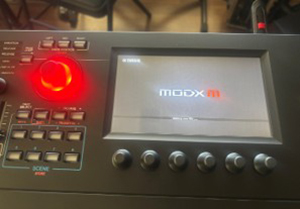 That’s what we did, and following the above process led to the Superknob turning red, indicating it was updating; it turned to green when it was completed. Prepare to wait on the update for a bit. Our time to upgrade took just over 20 minutes.
Now that we got that all out of the way, we were ready to play! We clocked about 22 seconds from turning the MODX M8 on to arriving at the loaded and playable OS. We wouldn’t have minded if this was faster (i.e., 22 seconds to reboot in the middle of a live performance wouldn’t be ideal), but this wasn’t as bad as we have encountered on modern keyboard workstations.
Since we had checked out the other two sound engines in the original MODX, we were curious about the new analog AN-X engine. Fortunately, pressing the category button allows you to choose which sounds you want to sort through: presets, user, favorites, and even which sound engine(s) are utilized. We selected the AN-X selector (under attributes), and on the left side of the screen appeared all the presets utilizing this engine. Between the touch screen and knob below the screen, we could get through these pretty easily—though we did think the typeface was borderline small and that the touch screen occasionally had to be pressed more than once to make a selection, but neither of these were deal breakers or unique to touch screens on synthesizers (and we grudgingly admit… we no longer have the eyesight of a 20 year old). It certainly was good fun going through the analog synth presets, and there were even some old-school synth drum kits mapped across the keyboard.
Speaking of synth playing: isn’t this a weighted keyboard? The answer, of course, is Yes. Interestingly, the Yamaha MOXF8 (which we own), the original MODX (which we reviewed previously), and the new MODX M8 which is the subject of this review, all use the same GHS (Graded Hammer Standard) keyboard. However, the new MODX M8 reportedly uses an improved version of this, utilizing a longer mechanism that requires more finger weight. Indeed, while we don’t have the original MODX in our studio anymore, we did do a side-by-side comparison of the MOXF8 and the MODX M8, and while the feel was similar (a good thing!), the MODX M8 version definitely felt a bit heavier to play. We didn’t mind this, actually. To us, it was still a lighter action than our nearby Arturia Keylab 88 mk2 which is known for its heavier feel. What we would have liked, however, is a little bit of texture on the keys. The keytop surfaces were smooth, and although didn’t impede playing, we would have preferred a slight texture to them. That’s just a preference of ours to feel more piano-like, but that might not be true for all players personal tastes.
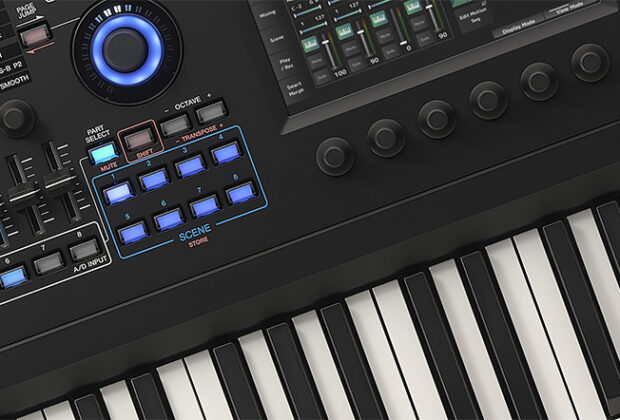
One of the more noticeable differences from the first MODX version was the inclusion of eight sliders (vs. the original four), giving more instant access to parts on-the-fly without having to toggle banks as we did previously. This should be a welcome addition to all users.
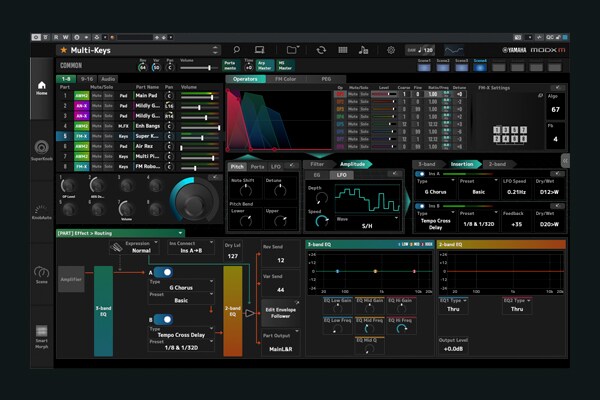 We received a demo at The NAMM Show of the ESP plugin, a recreation of the MODX M (or Montage M, if that’s what you bought). The only way to get it is via an access code included with your purchase of the actual hardware (though it doesn’t need the hardware to run or be installed). We use Pro Tools in our studio, and the plug-in only comes in AU or VST3. Out of luck? No! Using Blue Cat Audio’s excellent Patchworks plug-in wrapper, we were able to run ESP in Pro Tools without any issues! This is great news for those looking to use ESP in their Pro Tools setups. You may authorize up to three computers for ESP, allowing you to have one copy in the studio, and one on your mobile laptop, for example. We thought this was pretty cool! We used MIDI learn from within the Patchworks plug-in to assign the Superknob to a, well, smaller knob on our Arturia Keylab controller, and it worked just fine! Fantastic!
Overall, our impression is the same as what we have said previously: players used to the MONTAGE or even the previous MODX or MOTIF variants of Yamaha synths should be able to get around reasonably well on the MODX M keyboards. However, players used to Korg and/or Roland systems and nomenclature may find Yamaha’s OS takes a little bit of time to understand.
Sound
This is, not surprisingly, a strong suit for the MODX M. Building upon two already great and proven engines (AWM2 and FM-X), the new AN-X engine is yet another strong addition to the MODX line. What you liked before—pianos, orchestral, FM, electromechanical pianos, organs and beyond are all there. And with eight sliders now, you can fully address them as organ drawbars unlike the previous generation with only four.
But now, there’s the whole world of analog sounds via the AN-X engine, which was great fun for us to check out. There were some whimsical preset names used, presumably to avoid copyright infringement, but those astute enough can figure it out. A few of these were “Party Chords,” clearly a take on the Oberheim sound from Prince’s “1999” hit; “Alternate Wayz,” a take on the Jupiter sound from Journey’s “Separate Ways”; and “Sweet Synths,” a take on the synth sound from The Eurhythmics “Sweet Dreams.” Of course, there are plenty of bread and butter synth sounds here: leads, sine waves, synth brass, pads, and of course, glassy FM type sounds.
Focusing a little more on the AN-X engine, we thought that by itself, it could do what we would expect: Yamaha CS-80 soundscapes, Roland Strings, Prophet and Moog leads, and so on, but most are not labelled as such (as mentioned in our examples previously), so you will have to use your ears! These were all solid, but by themselves, didn’t really break any new ground. However, the real magic happens when the AN-X engine sounds are combined with the other engines for thick sounds and/or complex grooves.
Using the screen to sort sounds, we found categories of Rock, R&B, Hip Hop, and Electronic. Additionally, the Ethnic category had not only individual instruments (koto, mbira, djembe, etc.), but whole landscapes built from multiple layers that were pretty cool. When all is said and done, there’s a varied number of style categories, and even a few trance presets buried within above-mentioned categories, that should appeal to just about everyone.
The sequencer on board deserves special mention, particularly for players familiar with the KARMA technology found in some classic Korg and Yamaha products. As great as KARMA is/was, this is even better! KARMA utilized one (usually) sound engine at a time, and took what you were playing and generated an unpredictable MIDI pattern based on algorithmic phrase generation. Yamaha utilizes multiple sound engines (three in the M-series) and uses large libraries of pre-recorded patterns, drums grooves, and instrument phrases, with dozens of changes across up to eight layered parts simply by turning the super knob. Our simplest description would be “next-level KARMA” though you can’t really call it that. There’s a lot of movement going on, and the results really do sound great! If you’re creating original compositions, you can get lost in these variations.
Documentation and Support
The MODX M ships with a printed manual (Bravo!), which is also available as on online download. It does a decent job of explaining the sound architecture and how to get around with the basics. Fortunately, Yamaha has quite a few videos on the MODX M here Yamaha Synthesizers - YamahaSynth to show you hands-on examples of how to do things with the MODX M, though the videos are mixed in with other synths including the Montage and Reface lines. You will have to sort out and pick what you need/want. We didn’t need to call product support for this review, but historically the few times we had a question Yamaha was fairly prompt in getting back to us.
Price
The Yamaha MODX M8 ($3,099 MSRP) sells online for $2,499.
We think Yamaha has hit a sweet spot for features and price. You get the same flagship Montage M sound engines, a good 88-key, weighted keyboard in a 30-pound package, and it plays and sounds great! Even better, the included ESP plug-in replicates the MODX sound exactly, so you literally can take your MODX anywhere and use any controller you like. The few things we’d like to see added or improved are available—but in the Montage M8x at nearly double the price (and weight)! If you are looking to get into the Montage ecosystem without breaking the bank, you really should check out the MODX M8. But not ours. We might have to keep this one for ourselves.
Contact Information
Yamaha
usa.yamaha.com